
This comprehensive guide explains how to leverage Google Gemini 2.0 to analyze your site’s SEO performance and derive actionable insights for optimization. It’s a valuable resource for anyone looking to interpret Google Search Console data effectively and turn it into impactful strategies.
3,656 views
How to Perform SEO Analysis with Gemini 2.0: A

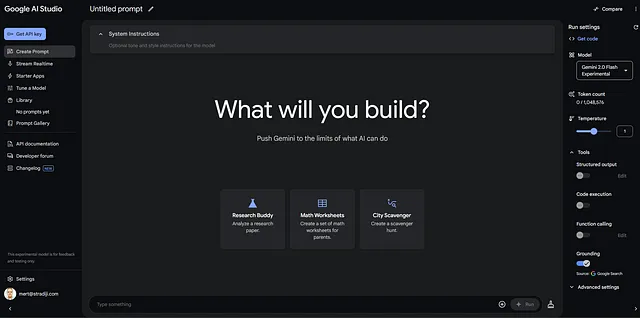
Step 1: Register on Google AI Studio
- Visit Google AI Studio and create an account. This platform offers the foundational tools needed to utilize Gemini 2.0 effectively.
- After signing up, select “Create a New Prompt” to begin.
Step 2: Choose the Gemini 2.0 Flash Model
- On the prompt creation screen, choose the Gemini 2.0 Flash model.
- The Flash model features “grounding,” enabling real-time internet access for comprehensive website analysis.
Step 3: Prepare Google Search Console Data
- Log into your Google Search Console (GSC) account.
- Navigate to Search Results and filter the URLs you want to analyze. For instance, limit to blog URLs with relevant filters.
- Choose a time range of at least 3 months to ensure data accuracy.
- Download the data in CSV format, focusing on “queries,” “pages,” and “search appearances.”
Step 4: Craft Your Prompt
To enable effective analysis, carefully structure your instructions (prompt) for Gemini 2.0. Below is an example:
Example Prompt:
I will provide Google Search Console (GSC) data reflecting my website’s performance metrics. Your task: 1. **Contextual Analysis**: Understand the website’s niche, target audience, and objectives using your search and data capabilities. 2. **GSC Data Analysis**: – Identify high-performing pages and keywords. – Spot low-performing areas with optimization potential. – Highlight content or topics driving traffic and engagement. 3. **Actionable Insights**: – Summarize what’s working well and why. – Suggest adjustments or improvements. – Note user behaviour patterns and keyword trends. 4. **Content Strategy Recommendations**: – Build on successful topics. – Identify gaps or untapped opportunities. – Propose evergreen or trending topics to enhance niche authority.
Paste your prompt into the designated field on Google AI Studio and add your website’s URL.
Step 5: Upload Your Data to Gemini 2.0
- Drag and drop the GSC CSV files into the interface.
- Only “queries,” “pages,” and “search appearances” are necessary for this analysis.
Step 6: Run the Analysis
- Click Run to initiate the analysis.
Step 7: Evaluate the Results
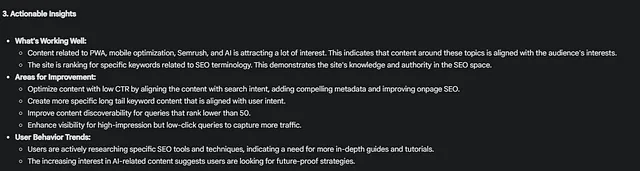
Gemini 2.0 provides detailed outputs, including:
- Best-performing pages and their click-through rates (CTR).
- Popular keywords.
- Underperforming areas require optimization.
- New content categories and ideas based on past successes.
These insights highlight high-impact areas to focus your efforts.
Step 8: Start Creating New Content
- Leverage Gemini 2.0’s recommendations for crafting new content.
- Conduct keyword research to integrate suggested keywords effectively.
- Optimize and refresh existing content with updated insights.
Closing Thoughts: SEO with Gemini 2.0
By following this guide, you can conduct in-depth SEO analysis and make strategic improvements to your website. Regularly analyzing data and implementing insights is crucial for SEO success.

These May Also Interest You










Make Stradiji a preferred source on Google
Google lets you pick the sources you want to see more of. Add Stradiji and our articles show up more often for you in search results and AI answers.
Add Stradiji on GoogleThe SEOs Diners Club
Every week, Mert Erkal breaks down what changed in SEO, GEO and AI search, backed by real tests and data. It's free.
Subscribe for freePopular Posts
The SEOs Diners Club · Weekly newsletter
Every Monday: what's actually moving in SEO and AI search
Mert Erkal breaks down one big shift each week, backed by real tests and data.
Free · 247 weekly issues since 2022 · Unsubscribe anytime
