
Selling to US shoppers? Your products are likely in ChatGPT already, but getting picked is harder. We checked 25 Shopify stores. Here’s what to fix first.
Popular Posts
Latest Articles

2,338 views
Shopify SEO in 2026: The Checklist for Google and AI Shopping Agents
Your Shopify store doesn’t sell in just one place anymore. There’s Google search on one side and AI chats like ChatGPT, Google AI Mode, Gemini and Microsoft Copilot on the other. Both look at the same thing: your product data. The good news is that Shopify turned most of the AI plumbing on for you in 2026. The bad news is that it can’t fill in the data for you.
We didn’t want to guess, so on Oct. 27, 2026, we opened 25 well-known US Shopify stores one by one. Twenty-two already publish a UCP agent profile and 19 have an llms.txt file. Most of them didn’t have to do a thing; Shopify did it for them. The product pages tell a different story. Only 5 of the 23 we could read put a GTIN in their structured data, and only 8 show a review rating there.
So the real work isn’t in the plumbing anymore. It’s in that gap. Below, we walk through what Shopify already did for you, what it didn’t, the three traps we keep running into, and a checklist you can score your store against.
Grab a coffee, and let’s dig in.
In a hurry? Here’s the short answer on Shopify SEO in 2026
- Fill in GTINs and get review ratings into your product schema. Those are the fields most stores miss.
- Open Sales channels > Agentic and choose your AI channels on purpose.
- Keep the Google basics strong: collections, clean product URLs, complete schema, speed.
- Track AI orders in Shopify admin, because in-chat checkouts don’t show up in GA4.
- Score your store with our free 30-point Shopify AI Readiness Scorecard.
Table of contents
What we found in 25 Shopify stores
In short, Shopify’s defaults now handle most of the agent-facing setup, and almost nobody blocks AI crawlers. Where stores fall short is product data. Most product pages we read were missing GTINs, review ratings or both.
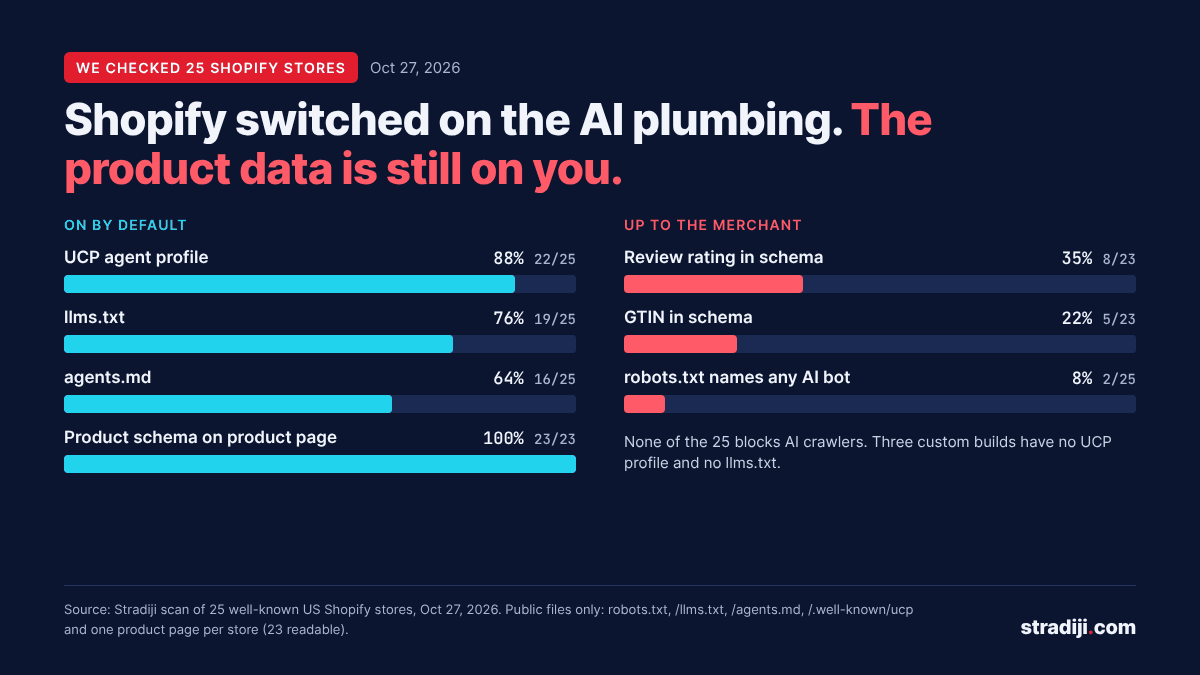
Stradiji scan of 25 US Shopify stores, Oct. 27, 2026
How we checked: on Oct. 27, 2026, we opened the public robots.txt, /llms.txt, /agents.md and /.well-known/ucp of 25 well-known US Shopify stores, plus one product page per store. We read only public files and sent nothing to any store. Two product pages could not be read, so the schema figures are out of 23. We checked whether a GTIN is present, not whether it identifies the right variant. So 5 of 23 is the best case, not the floor.
| # | Category | UCP profile | llms.txt | agents.md | GTIN in schema | Rating in schema |
|---|---|---|---|---|---|---|
| 1 | Accessories | Yes | Yes | Yes | No | No |
| 2 | Accessories | Yes | Yes | Yes | No | No |
| 3 | Apparel | Yes | Yes | Yes | Yes | Yes |
| 4 | Apparel | Yes | Yes | No | No | Yes |
| 5 | Apparel | Yes | No | No | No | No |
| 6 | Apparel | Yes | Yes | No | No | No |
| 7 | Apparel | No | No | No | Not read | Not read |
| 8 | Apparel | Yes | No | No | Yes | No |
| 9 | Apparel | Yes | Yes | Yes | No | No |
| 10 | Apparel | Yes | Yes | Yes | No | Yes |
| 11 | Beauty | Yes | Yes | Yes | Yes | Yes |
| 12 | Beauty | Yes | Yes | No | No | No |
| 13 | Beauty | Yes | Yes | Yes | No | Yes |
| 14 | Beauty | Yes | Yes | Yes | No | No |
| 15 | Beauty | Yes | Yes | Yes | No | Yes |
| 16 | Food and drink | Yes | Yes | Yes | Yes | No |
| 17 | Food and drink | No | No | No | No | No |
| 18 | Food and drink | Yes | Yes | Yes | No | No |
| 19 | Footwear | Yes | Yes | Yes | No | No |
| 20 | Home | Yes | Yes | Yes | No | No |
| 21 | Home | No | No | No | No | Yes |
| 22 | Home | Yes | Yes | Yes | No | Yes |
| 23 | Jewelry | Yes | No | No | Not read | Not read |
| 24 | Jewelry | Yes | Yes | Yes | Yes | No |
| 25 | Personal care | Yes | Yes | Yes | No | No |
Stradiji scan, Oct. 27, 2026. Public files only. Store names withheld; results are a snapshot of that day.
Three things caught our eye:
- None of the 25 blocks AI crawlers. Only 2 even name an AI bot in robots.txt. One of them, a beauty brand, takes it seriously enough to list 10 bots by name and allow every one.
- Custom builds lose the defaults. The three stores with no UCP profile and no llms.txt, one apparel, one food and one home brand, run heavily customized setups. Shopify’s defaults only help if they can reach your storefront. If an agency built you a custom theme, this is the first place to look.
- llms.txt is everywhere because Shopify generates it. We checked our own server logs: in 72 hours, AI bots asked for robots.txt 154 times and for llms.txt not once. Having the file doesn’t mean anyone reads it. Shopify now treats /agents.md as the main discovery file, with /llms.txt and /llms-full.txt serving the same content, and on Oct. 28, 2026, we found agents.md listed in a separate
sitemap_agentic_discovery.xmlon a live store. Google, for its part, says you don’t need AI text files to show up in its AI features.
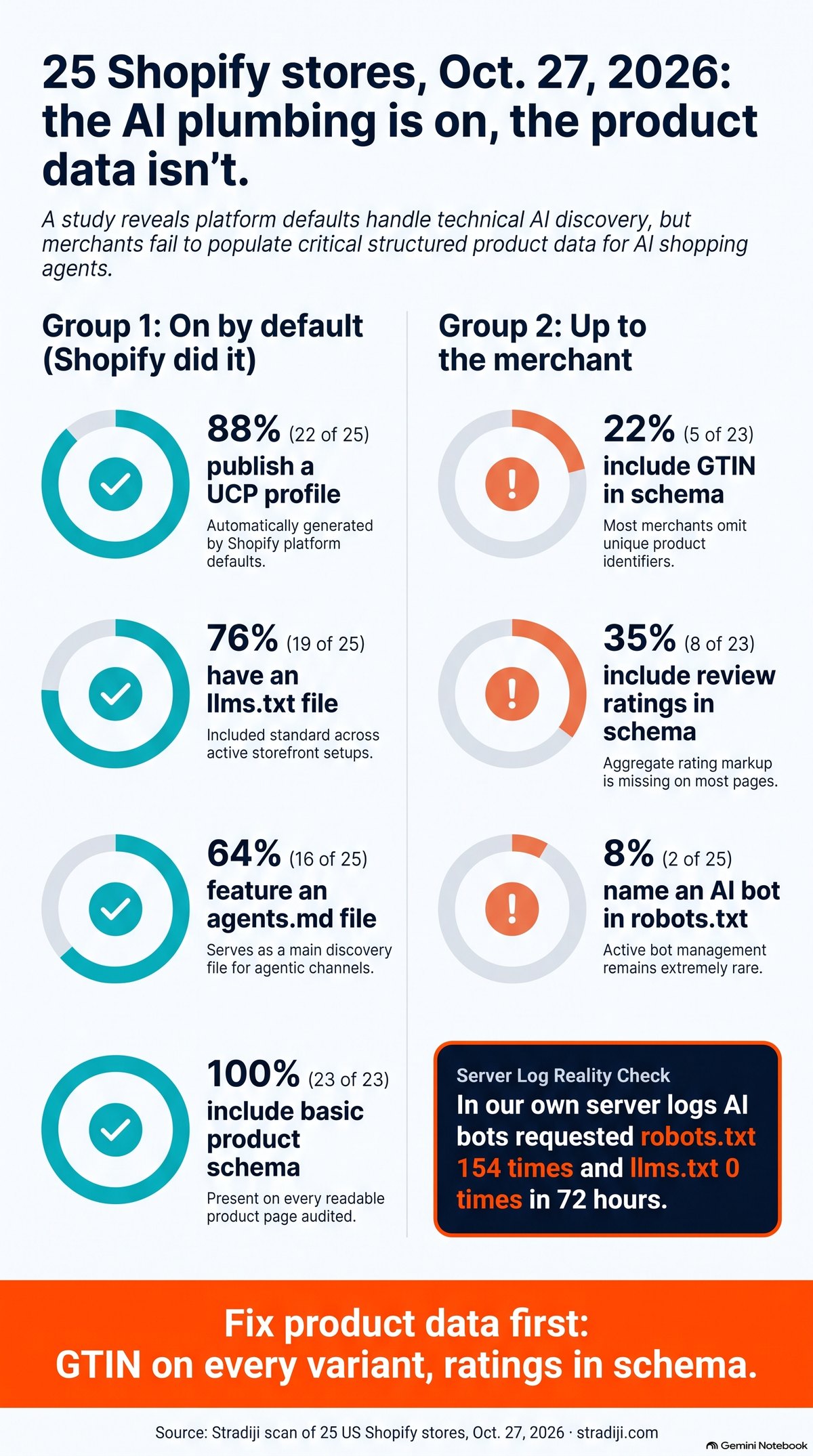
The 25-store scan at a glance. Infographic by Stradiji, made with NotebookLM from our Oct. 27, 2026, data.
What Shopify already turned on for you
If your store is eligible, your products are probably flowing into AI chats right now, whether you noticed or not. Shopify calls this Agentic Storefronts. It launched with the Winter ’26 Edition on Dec. 10, 2025, and it is active by default for eligible stores. You’ll find it under Sales channels > Agentic in your admin.
The engine underneath is Shopify Catalog. AI channels don’t crawl your theme to find products. They pull them straight from Catalog. To qualify, a product needs a title, at least one image, a price above zero and a published product URL, and it can’t be unlisted or hidden from search engines.
| AI channel | Default | Who can buy | Where checkout happens |
|---|---|---|---|
| ChatGPT | On for eligible stores | Stores that sell to US customers | On your own store, in a browser tab |
| Google AI Mode and Gemini | Direct checkout on | US, Canada, Australia (rolling out) | Inside the chat; products must also be in Google Merchant Center |
| Microsoft Copilot | Direct checkout on | US | Inside the chat |
| Meta | Direct checkout on | US, Canada, Mexico, Brazil, Japan, Singapore | In the app |
Source: Shopify Help Center, checked Oct. 27, 2026.
Two protocols do the work behind the scenes. Google’s Universal Commerce Protocol (UCP), announced Jan. 11, 2026, and co-developed with Shopify, powers checkout in AI Mode and Gemini. It’s the same /.well-known/ucp profile that 22 of our 25 stores already publish. OpenAI’s Agentic Commerce Protocol started with Instant Checkout, but on March 24, 2026, OpenAI pulled back to discovery: ChatGPT now finds the product and sends the shopper to your checkout.
One footnote on Perplexity: it was in Shopify’s launch announcement, but it isn’t one of the named channels in today’s Help Center. Until Shopify lists it again, we’re treating it as unconfirmed.
So why bother now? Shopify’s own data shows AI-referred orders grew nearly 13 times year over year in the first quarter of 2026, and those visitors converted about 49% better than organic (Shopify Enterprise, May 11, 2026). The numbers start from a small base, but the people who arrive are close to buying.
The Shopify MCP map, for whoever builds your store
Most merchants never touch this part, but your developer or agency will, so pass this section along. One date matters: the Global Catalog REST API stops serving traffic on Nov. 2, 2026 (Shopify changelog, Oct. 9, 2026). Anything built on it has to move to the Catalog MCP server.
| MCP server | What it does | Endpoint | Who it’s for |
|---|---|---|---|
| Storefront Catalog, Cart and Order (UCP) | Search one store’s catalog, build carts, look up orders | https://{shop}/api/ucp/mcp | Agent developers |
| Global Catalog MCP | Search products across all Shopify merchants | catalog.shopify.com/api/ucp/mcp | Agent developers |
| Checkout MCP | Create and complete checkouts | https://{shop}/api/ucp/mcp, token required | Trusted agent partners |
| Customer Accounts MCP | Order status and account details for a logged-in shopper | Found via /.well-known/customer-account-api | App developers |
| Dev MCP | Gives AI coding tools Shopify docs and validates GraphQL and Liquid | Runs locally: npx -y @shopify/dev-mcp@latest | Your developer |
Source: Shopify.dev, checked Oct. 27, 2026.
A quick heads-up for developers: the old Storefront MCP at /api/mcp lost its catalog and cart tools. Many guides published before mid-2026 still point there. If your custom shopping assistant suddenly stopped finding products, start there.
Google still does the heavy lifting
We say this every chance we get, so here it is again: good SEO is still most of good AI visibility. Google AI Mode and AI Overviews draw on the same index as regular search, and the stores AI chats recommend are usually the ones Google already trusts. We saw the same pattern in our Three Doors study. On Shopify, five things decide most of it.
- Collection structure. Collections are your category pages, and they win the commercial queries. Plan them around how people search before launch. Rebuilding collections later means new URLs, redirects and months of lost momentum.
- Canonicals. Shopify sets canonical tags for you, but themes often link to
/collections/x/products/y. Make internal links point to the clean/products/yURL so link equity doesn’t split. - Product schema that is complete. Every product page we could read had Product or ProductGroup markup. Most stopped at name, price and brand. Add GTIN, review rating and availability. Those are exactly the fields that separate products when an agent compares them. Put the GTIN on each variant, not once on the parent product.
- Speed and Core Web Vitals. Each app adds scripts. Audit apps twice a year and remove what you don’t use. Target Core Web Vitals of LCP under 2.5 seconds and INP under 200 milliseconds.
- Content that answers buying questions. Use product descriptions and a short FAQ per product to answer what shoppers ask an assistant: sizing, materials, who it’s for, how it compares. Unique copy per product, never the manufacturer’s text. Then make sure the page converts the visit; our conversion optimization work starts there.
Shopify generates the XML sitemap and robots.txt. Your job is to submit the sitemap to Google Search Console and Bing Webmaster Tools and check indexing there every month.
Five more Shopify details we always check
- Filter URLs. The Search & Discovery app creates filtered collection URLs with
filter.v.andfilter.p.parameters, and Google can crawl and index thousands of them. Decide which filtered pages deserve to rank, and keep the rest out of the crawl. Google’s faceted navigation guide says blocking unneeded filter URLs in robots.txt works better than leaning on canonicals. - Pagination. Each collection page (
?page=2,?page=3) needs its own URL and its own canonical, linked with plain links. Google doesn’t click “Load more” buttons, so an infinite-scroll theme still needs real paginated URLs behind it (Google on pagination). - Variant URLs. Shopify gives each variant a
?variant=URL that canonicalizes to the main product page, which is what Google recommends. Check that your Merchant Center feed points to final URLs, not redirects. - Sold-out and discontinued products. Keep temporarily sold-out products live and marked OutOfStock. When a product is gone for good, 301-redirect it to the closest product or collection instead of leaving a 404 that throws away its links.
- Markets for the US, UK and Australia. Selling in more than one English-speaking market? Shopify Markets adds hreflang tags, canonicals and market sitemaps for you. Subfolders such as
/en-gb/and/en-au/keep all your authority on one domain.
Win Google’s free product grids
Before AI chats, there was a channel most Shopify stores still underuse: Google’s free product listings and organic product grids. AI Mode draws on the same Merchant Center data, so work here pays off twice. Where stores lose out is usually a gap between people, not technology: the marketing team runs the feed, someone else runs the website, and the two quietly drift apart.
Google reads your products in two ways: the structured data on your pages and the feed in Merchant Center. It recommends using both, because crawling alone isn’t guaranteed to find every product. When the two disagree, you lose listings. Here’s what we look at first.
- Compare two Search Console reports. Merchant listings covers pages where people can buy; Product snippets covers the rest (Google on shopping reports). If Merchant listings shows far fewer valid items than Product snippets, your variant markup or your feed is usually the reason.
- Mark up variants as ProductGroup. Many older themes still describe variant products with AggregateOffer, which merchant listings don’t accept. Google’s variant guide asks for ProductGroup with hasVariant and variesBy, and Shopify’s Liquid
structured_datafilter outputs it. - Make the feed and the page say the same thing. Same title, same price, same availability. Show the model number on the page and send GTIN or MPN. For custom or handmade goods with no GTIN, set identifier_exists to no instead of inventing one.
- Put shipping and returns on record. Set a store-wide return policy and shipping details in Merchant Center, or as Organization markup on your site. Google shows them right in the listing, and shoppers compare on them.
- Tag free listing clicks properly. Check how the links in your feed are tagged. If free listing clicks land in GA4 as paid traffic, you will undervalue the channel. Tag them as organic so they’re counted where they belong.
Mert’s note: One product record now feeds many storefronts: your own site, Google’s grids, AI Mode, ChatGPT and Copilot. We stopped thinking of SEO and AI visibility as separate projects. Get the product data right once, keep it in sync everywhere, and every channel gets better at the same time.
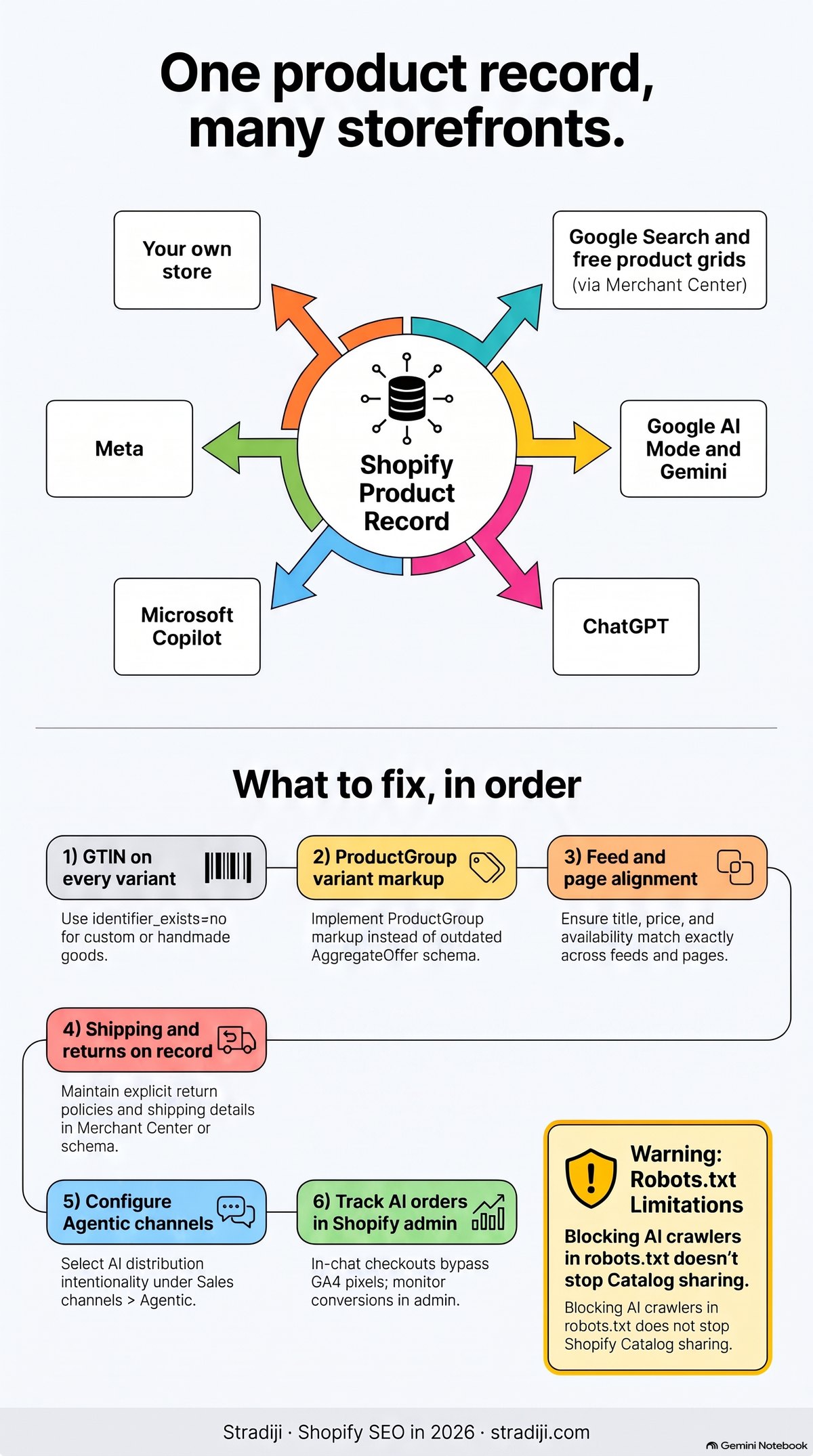
One product record, many storefronts, and what to fix first. Infographic by Stradiji, made with NotebookLM.
Three traps we keep seeing
Trap 1: Your AI sales disappear from GA4. When a shopper buys inside Google AI Mode or Gemini, Shopify runs the checkout in the chat, and Google Analytics and custom pixels don’t fire there. If you judge channels in GA4 alone, the AI channel looks smaller than it is. For AI orders, look at the Agentic home report in Shopify admin and put it side by side with GA4 every month.
Trap 2: Hiding a product from AI hides it from Google too. There is no per-product switch for AI channels only. The way Shopify documents to keep a product out of every AI channel, Unlisted status, also remove it from search engines. Decide product by product, and know what you’re giving up.
Trap 3: robots.txt does not stop catalog sharing. Blocking GPTBot or ClaudeBot in robots.txt.liquid keeps those crawlers off your pages. Shopify’s own docs say it does not stop Shopify from syndicating your Catalog to AI channels. If you really want out, switch it off in Sales channels > Agentic, and Shopify says it can take up to 7 days for sharing to stop.
The Shopify AI readiness checklist: the first 10 items
Not sure where to start? Start here. These are the 10 items we found missing most often, and each one takes hours, not weeks.
- One correct GTIN per variant. Fill the Barcode field on every variant, and make sure each code identifies that exact variant. A real barcode for the blue medium shirt is still wrong on the red large one. The Barcode field feeds Shopify Catalog and Merchant Center; whether it also reaches your page schema depends on your theme, so check both. 18 of the 23 product pages we read had no GTIN in their schema at all. For custom or handmade products without a GTIN, tell Google so rather than making one up. Thanks to Scott Stouffer for pushing us on variant accuracy.
- Review rating in your product schema. Collect reviews and make sure your review app outputs aggregateRating. 15 of 23 had none.
- Agentic channels chosen on purpose. Open Sales channels > Agentic and decide channel by channel instead of leaving “Allow Shopify to manage for me” on by default.
- Store policies complete. Terms of service, privacy and returns are required for Agentic Storefronts.
- Google Merchant Center connected. AI Mode and Gemini checkout need your products there too.
- Knowledge base filled in. Sales channels > Agentic > Knowledge base is where agents read your shipping, returns and FAQ answers. The old Knowledge Base app is will be retired on Jan. 15, 2027.
- Product schema complete. Brand, offers, availability, GTIN and rating, set per variant and matching what the page shows.
- Internal links to clean product URLs.
/products/y, not/collections/x/products/y. - AI orders reconciled. Compare Agentic home AI orders with GA4 every month, because in-chat checkouts don’t fire your pixels.
- Developer integrations off the Global Catalog REST API before Nov. 2, 2026.
Score your store: the free Shopify AI Readiness Scorecard
The one thing to do this week: Open your 20 best-selling products and check that every variant has its own barcode filled in, not one code copied across sizes and colors. If it doesn’t, start there.
Those 10 items are the start. The full scorecard has 30 items in five sections: product data, catalog and AI channels, technical and schema, measurement, and the Google foundation. You mark each item yes, partly or no and get a score out of 60, a score per section, and the three fixes worth doing first. It takes about five minutes.
Leave your name and email, and the scorecard opens right away. We’ll also email you the link so you can come back to it anytime.
Curious how your whole site shows up in AI answers, not just the store? Try our free GEO Score Card.
FAQ
Is Shopify good for SEO in 2026?
Yes, for most stores. Shopify handles sitemaps, canonicals, product schema and, since 2026, the UCP profile and Catalog feed that AI channels read. What it can’t do for you is fill in your product data or plan your collections.
Do I need an SEO app on Shopify?
Usually not for the basics. Shopify covers those now. A review app that outputs rating schema earns its place. Every extra app adds scripts, so add one only for a gap you can name.
How do I get my Shopify products into ChatGPT?
If your store sells to US customers and your products meet Shopify Catalog’s requirements, Agentic Storefronts likely already shares them. Check Sales channels > Agentic. Then improve titles, GTINs, reviews and descriptions so ChatGPT has a reason to pick your product.
Does llms.txt help my Shopify store?
Shopify generates one for most stores, so you probably have it. In our own server logs, AI bots requested llms.txt zero times in 72 hours while they requested robots.txt 154 times. Don’t expect it to move rankings or citations.
How do I get my Shopify products into Google’s free product grids?
Connect Merchant Center (the Google & YouTube channel does this for you) and keep product sync on. Mark up variants with ProductGroup, and make sure titles, prices and GTINs match between your pages and your feed. Then watch the Merchant listings report in Search Console.
Should I block AI crawlers on Shopify?
None of the 25 stores we checked does, and blocking crawlers in robots.txt wouldn’t stop Catalog sharing anyway. If you want out of AI channels, switch them off in Sales channels > Agentic.
My products have no GTIN. Is brand + MPN enough?
Yes, that’s Google’s accepted fallback. For truly handmade or one-off items, set identifier_exists to no and leave GTIN and MPN blank. In apparel, sizes often share one MPN, so if you sell beyond your own store, GS1 codes are worth getting.
Can I use the same barcode on several variants or a multipack?
No. Every size, color and pack size is a separate product with its own GTIN. Merchant Center flags duplicates, and an agent can’t tell which one you’re selling.
I filled in barcodes, but Search Console still says no global identifier. Why?
Your theme probably doesn’t print the barcode into its product schema. The feed has it, the page doesn’t. Test a product URL in Google’s Rich Results Test, and ask your developer to output gtin per variant.
Can I put my supplier’s internal codes or numbers I made up in the Barcode field?
Not if they aren’t real GS1 codes. The Barcode field is for GTINs (UPC, EAN, ISBN). Put internal codes in the SKU field instead. A fake GTIN is worse than none.
Sources
- Stradiji scan of 25 Shopify stores, Oct. 27, 2026
- Shopify Help Center: Agentic Storefronts and its channel pages for ChatGPT, Google, Microsoft, Meta and products
- Shopify Catalog requirements
- Shopify Help Center: editing robots.txt
- Shopify Help Center: Knowledge base
- Shopify Winter ’26 Edition: Agentic Storefronts, Dec. 10, 2025
- Shopify.dev: agents, Global Catalog, Checkout MCP, Customer Accounts MCP, AI Toolkit
- Shopify changelog: Global Catalog REST API stops Nov. 2, 2026, Oct. 9, 2026
- Google: Universal Commerce Protocol, Jan. 11, 2026
- OpenAI: Powering product discovery in ChatGPT, March 24, 2026
- Shopify Enterprise: AI search insights, May 11, 2026
- Google Search Central: sharing product data, URL structure, pagination, faceted navigation, product variants, merchant listings, AI features and your website
- Search Console shopping reports, Merchant Center identifier_exists, Shopify Markets SEO, Shopify changelog: structured_data supports ProductGroup
Related

These May Also Interest You





The SEOs Diners Club · Weekly newsletter
Every Monday: what's actually moving in SEO and AI search
Mert Erkal breaks down one big shift each week, backed by real tests and data.
Free · 246 weekly issues since 2022 · Unsubscribe anytime
